
Why does it look as though certain empty seats are not being offered for sale?
You might notice in the shopping page — or someone might draw to your attention — that certain seats are not being offered for sale even though they are still empty and available. It might look like this, where the seat count is set to 1:
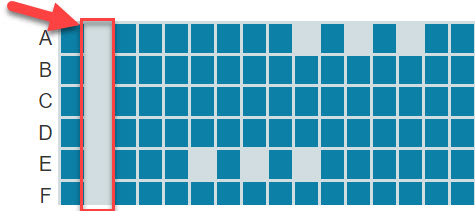
Red highlight rectangle surrounds empty seats that are not being offered to avoid isolating the seats to their left.
The system tries to avoid offering seating options that would leave isolated single seats unsold, on the assumption that it can be harder to sell such seats. In this example, selling any of the seats next to the aisle seats would isolate a single aisle seat.
In the example above, it’s not that those seats aren’t available — they just aren’t being offered with seat count of 1. Changing the seat count to 2 demonstrates this:
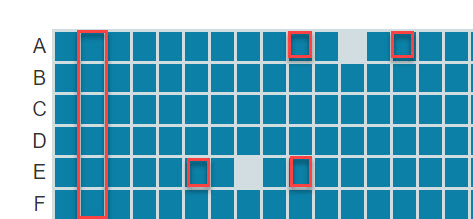
Red highlight rectangles surround seats that were not being offered at seat count 1, but are being offered at seat count 2.
Now those seats adjacent to the aisle seats can be offered as part of a pair of seats, where the pair includes the aisle seat. Similarly, the four single red squares highlight seats that weren’t being offered at seat count 1, because they would have created an isolated single seat, but are now being offered as part of a pair. The actual availability is shown here:
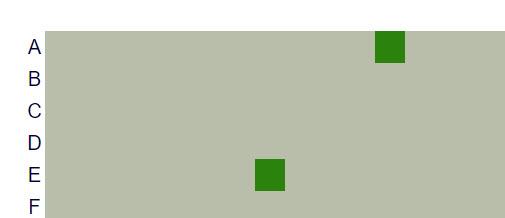
Manage seats page shows the actual availability of the seats: Two seats sold online, one in row A and one in row E.
As the seats fill up, the policy gets more lenient: It won’t deny someone a reservation unless there’s a rough equivalent available even if that means leaving an isolated seat.
This policy applies globally by default, but if you prefer we can make the default not to use this policy. In addition, you can specify on a per-event basis whether to use this policy:
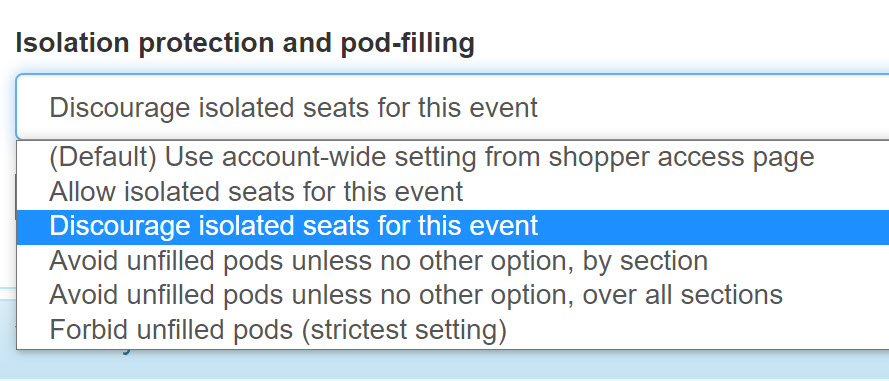
You can set the policy for individual events in the event configuration page, under the Social distancing section.
It’s a little misleading that this setting is lumped in with the Social distancing settings, because only the last three entries have anything to do with social distancing, but that’s where we put it.
